Motorola Chile Logo: Transparent PNG and SVG Download
↓ Download all (ZIP)The Motorola Chile logo read from motorola.cl is available here as transparent PNG and JPG. It is displayed at 50 × 50 px in the site's header, about 1.0 times wider than it is tall. The site's favicon is provided as PNG.
 Icon
About these files
The checkered tiles show the logo with no background. PNG files have a transparent background and measure 200 × 200 px. The Motorola Chile name, logo and brand assets are trademarks of their owner. Gravity is not affiliated with or endorsed by Motorola Chile.
Motorola Chile Brand Colors: Palette and HEX Codes
Motorola Chile's website is built on navy #011428, white #FFFFFF, gray #979899 and black #000000. No single brand color stands out on the homepage, apart from a blue #559EEA accent on its links.
| HEX | Color | RGB | HSL | CMYK | Observed use |
|---|---|---|---|---|---|
| NavyInk | 1, 20, 40 | 211°, 95%, 8% | 98, 50, 0, 84 | Background, border, fill, text | |
| WhiteBackground | 255, 255, 255 | 0°, 0%, 100% | 0, 0, 0, 0 | Background, border, button, link | |
| BlueAccent | 85, 158, 234 | 211°, 78%, 63% | 64, 32, 0, 8 | Link, text | |
| GraySurface | 151, 152, 153 | 210°, 1%, 60% | 1, 1, 0, 40 | Background, fill, text | |
| BlackText | 0, 0, 0 | 0°, 0%, 0% | 0, 0, 0, 100 | Button |
Show 4 more colors
| Dark gray | 19, 20, 23 | 225°, 10%, 8% | 17, 13, 0, 91 | Background, border, button, icon | |
| Light gray | 233, 234, 242 | 233°, 26%, 93% | 4, 3, 0, 5 | Background, fill | |
| Blue | 56, 77, 221 | 232°, 71%, 54% | 75, 65, 0, 13 | Text | |
| Light gray | 210, 210, 210 | 0°, 0%, 82% | 0, 0, 0, 18 | Fill |
CMYK values are computed from the screen values and are indicative. Click a color to copy its code.
Motorola Chile Fonts
On its homepage, Motorola Chile sets both its headings and its body text in Montserrat.
Montserrat
Used for: headings, subheadings, body text, buttons, menu
Regular 400Medium 500SemiBold 600Bold 700
Hosted by the site itself. Its license is not known: check with the type foundry before reusing it.
Moto Sans
Loaded by the site, with no identified use on the homepage
Regular 400
Hosted by the site itself. Its license is not known: check with the type foundry before reusing it.
Export the Motorola Chile Brand Kit
Motorola Chile's colors and fonts read from motorola.cl are ready to copy as CSS variables, as design tokens in JSON and as a Tailwind configuration.
Figma
Copy the brand board, then paste it into Figma (Ctrl or Cmd + V). If pasting does nothing, drag the SVG board into your Figma file.
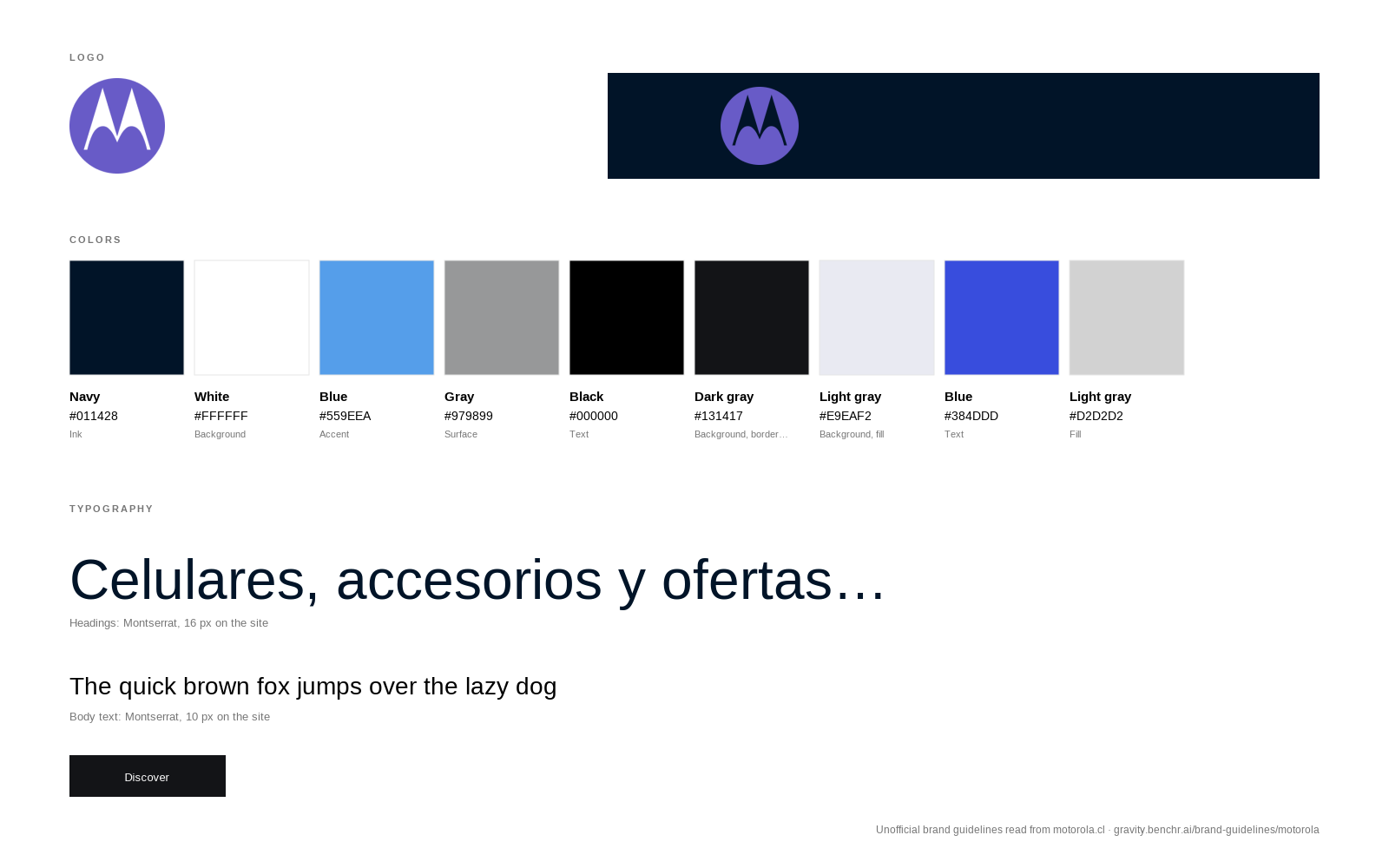
To create Figma variables, open the Variables view, create a collection and drag the variables file into it (Professional plan and above). The tokens file can be imported into Figma with the Tokens Studio for Figma ↗.
Show the code: CSS variables, design tokens, Tailwind
:root {
  --color-ink: #011428;           /* navy */
  --color-background: #FFFFFF;    /* white */
  --color-accent: #559EEA;        /* blue */
  --color-surface: #979899;       /* gray */
  --color-text: #000000;          /* black */
  --color-dark-gray: #131417;     /* dark gray */
  --color-light-gray: #E9EAF2;    /* light gray */
  --color-blue: #384DDD;          /* blue */
  --color-light-gray-2: #D2D2D2;  /* light gray */
  --font-heading: Montserrat;
  --font-body: Montserrat;
}{
"color": {
"ink": {
"$value": "#011428",
"$type": "color"
},
"background": {
"$value": "#FFFFFF",
"$type": "color"
},
"accent": {
"$value": "#559EEA",
"$type": "color"
},
"surface": {
"$value": "#979899",
"$type": "color"
},
"text": {
"$value": "#000000",
"$type": "color"
},
"dark-gray": {
"$value": "#131417",
"$type": "color"
},
"light-gray": {
"$value": "#E9EAF2",
"$type": "color"
},
"blue": {
"$value": "#384DDD",
"$type": "color"
},
"light-gray-2": {
"$value": "#D2D2D2",
"$type": "color"
}
},
"font": {
"heading": {
"$value": [
"Montserrat"
],
"$type": "fontFamily"
},
"body": {
"$value": [
"Montserrat"
],
"$type": "fontFamily"
}
}
}// tailwind.config.js
module.exports = {
theme: {
extend: {
colors: {
motorola: {
ink: '#011428',
background: '#FFFFFF',
accent: '#559EEA',
surface: '#979899',
text: '#000000',
'dark-gray': '#131417',
'light-gray': '#E9EAF2',
blue: '#384DDD',
'light-gray-2': '#D2D2D2',
},
},
fontFamily: {
heading: ['Montserrat'],
body: ['Montserrat'],
},
},
},
}Motorola Chile Competitors and Similar Brands
The brands closest to Motorola Chile are motorola.com.pe, vivo and Loja Oficial OPPO, according to Gravity's similarity score.
 M
 V
 L
 V
 I
 H
Similarity is precomputed by Gravity from catalogues, prices, estimated traffic, markets and site types on 30 October 2026; visits are estimated.
Motorola Chile's Visual Identity in Use
 HomeProductsAboutContact
Encuentra lo más nuevo y exclusivo de motorola en nuestra tienda oficial. ¡Hasta 12 cuotas sin interés + envío gratis!
Show the text styles table
| Role | Font | Weight | Size | Color | Details |
|---|---|---|---|---|---|
| Headings | Montserrat | Regular 400 | 16 px | #011428 | line-height 18.4px |
| Subheadings | Montserrat | Bold 700 | 16 px | #001428 | line-height 18.4px |
| Body text | Montserrat | Regular 400 | 10 px | #000000 | line-height 11.5px |
| Buttons | Montserrat | SemiBold 600 | 14 px | #ffffff | line-height 14px |
| Menu | Montserrat | Regular 400 | 12 px | #131417 | line-height 14px |
| Button 1 | background #131417 | text #ffffff | radius 21px · border #131417 | ||
| Button 2 | background #000000 | text #ffffff | radius 4px · border #ffffff | ||
| Button 3 | background transparent | text #011b34 | radius 0px | ||
Motorola Chile Brand Guidelines FAQ
What are Motorola Chile's brand colors and fonts?
Motorola Chile uses Montserrat for both headings and body text. Its website is built on navy #011428, white #FFFFFF and gray #979899. No single brand color stands out on the homepage, apart from a blue #559EEA accent on its links. Read from motorola.cl on 26 November 2026.
What does the Motorola Chile logo look like?
The Motorola Chile logo read from motorola.cl is available here as transparent PNG and JPG. It is displayed at 50 × 50 px in the site's header, about 1.0 times wider than it is tall. The site's favicon is provided as PNG.
How do I download the Motorola Chile logo?
The Motorola Chile logo can be downloaded on this page as transparent PNG and JPG. The “Download all” button bundles every file into one.
Can I use the Motorola Chile logo?
The Motorola Chile name and logo are trademarks of their owner, and Gravity does not grant any right to use them. Using them to refer to the brand is usually tolerated, but check Motorola Chile's own brand guidelines or ask the company before any commercial use.
What are Motorola Chile's brand colors?
Motorola Chile's website is built on navy #011428, white #FFFFFF, gray #979899 and black #000000. No single brand color stands out on the homepage, apart from a blue #559EEA accent on its links.
What is Motorola Chile's main color HEX code?
No single brand color stands out on Motorola Chile's homepage. Its main text color is navy #011428 and its background is white #FFFFFF.
What font does Motorola Chile use?
On its homepage, Motorola Chile sets both its headings and its body text in Montserrat.
Is Motorola Chile's font free to use?
Montserrat is hosted by Motorola Chile's own website and its license is not known: check with the type foundry before using it.
Who are Motorola Chile's competitors?
The brands closest to Motorola Chile are motorola.com.pe, vivo and Loja Oficial OPPO, according to Gravity's similarity score.
How do I use Motorola Chile's colors in Figma or in code?
In Figma, copy the brand board from this page and paste it, or import the variables file. In code, copy the CSS variables, the Tailwind configuration or the design tokens in JSON from the Export section.
Where do these brand guidelines come from?
They were read automatically by Gravity from the motorola.cl homepage on 26 November 2026: the colors, fonts and logo are those the site displays. They are not official and may differ from Motorola Chile's internal brand book.
Who are the Motorola Chile brand guidelines for?
This page brings together Motorola Chile's visual identity as it appears on its website: color codes, fonts, ready-to-download logos and files for Figma or code. It is useful for anyone who needs to talk about the brand, work with it or draw inspiration from it.
- The Motorola Chile team: share a single link with partners, agencies, retailers and journalists so they find the right logo, colors and fonts right away, without email back-and-forth or outdated files. Claim this brand. Why claim it: the brand corrects its own logo, colors and information; its partners, search engines and AI assistants then find the right assets, which helps its visibility in search; it can respond to the data published on its Gravity page; and it can receive its Gravity badge, to display on its website or announce on LinkedIn.
- Designers: get the exact HEX, RGB and CMYK codes, the fonts and the logo as SVG or transparent PNG, and bring the palette into Figma in a few clicks.
- Developers: copy the CSS variables, the Tailwind configuration or the JSON design tokens to build for Motorola Chile without guesswork.
- Agencies and freelancers: prepare a proposal, a campaign or a pitch for Motorola Chile that respects its identity from the very first mockup.
- Marketing and partnership teams: create co-branded visuals, ads or event materials that match the brand's look.
- Journalists, bloggers and content creators: illustrate an article or a video about Motorola Chile with the logo and colors used on its website.
- Retailers and marketplaces: present Motorola Chile's products in a store or a catalog with the right brand elements.
- Students and branding enthusiasts: study how Motorola Chile builds its visual identity and compare it with its competitors'.
Commercial use of the logo and brand assets requires Motorola Chile's permission: see the notice at the bottom of this page.
Motorola Chile (motorola.cl) presents itself as: “Encuentra lo más nuevo y exclusivo de motorola en nuestra tienda oficial. ¡Hasta 12 cuotas sin interés + envío gratis!” This page gathers its visual identity as it appears on the site: 9 colors with their codes, 2 fonts and their uses, and the logo ready to download.
Unofficial brand guidelines, read automatically from the motorola.cl homepage.